Web push notifications: the highly engaging channel you need
11
September
Category: Data
With the rise of online shopping, marketers are constantly looking for new ways to boost engagement. Did you know you can boost your e-commerce sales with a simple tool? And that you can start using it right now? Discover web push notifications!
Just like on mobile, web push notifications (browser notifications) are a great wayto boost your conversions andengage with your customers, both on mobile and desktop.
Web push (or web push notification) is a communication channel that allows a short push message to be sent to a web browser—whether desktop or mobile—from a specific website.
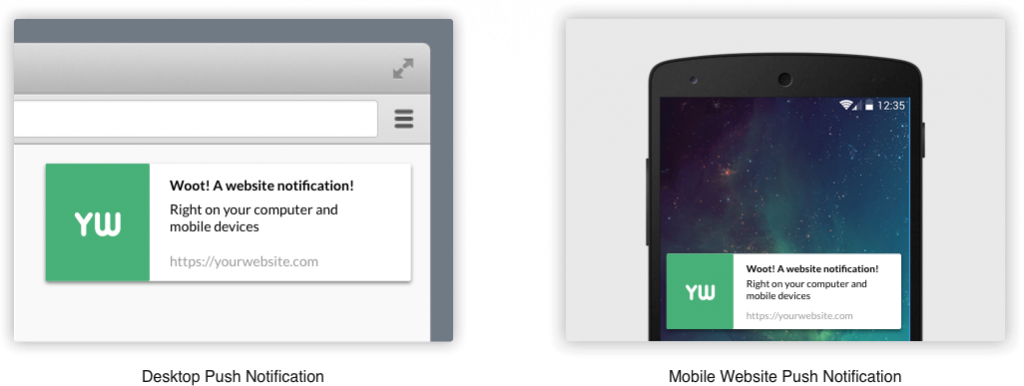
Examples of web push notifications on mobile and desktop
Source: neilpatel.com
This new communication channel, which first appeared in 2015, is highly effective in driving customer engagement.
Web push technology allows you to display real-time alerts to your customers whenever their browser is active, even if they aren’t currently on your site when the alert is received.
The concept is similar to the " push notifications" sent on iOS or Android, but has the advantage of not requiring the development of a mobile app. Any business with a website can use push notifications to attract customers.
Before sending push notifications, you must first obtain permission from your contacts and build a list of users who have opted in to receive web notifications. Signing up is very simple.
As mentioned above, the first step is to obtain consent from your future subscribers before sending them push notifications. Signing up is easy. It’s done by sending an initial notification when visitors come to your site, asking them for permission to send them web notifications.
You can decide when is the best time to display the first registration request notification:
When you send the alert, your subscribers don’t need to be on your website to receive the notification. Those who have their browser open will receive the notification in real time. Others will see it the next time they open their browser.
Web push notifications work on the following browsers: Chrome, Firefox, Safari, Opera, and Edge, which together account for nearly 80% of the market. With the exception of iOS, they work on both desktop and mobile devices.
Please note that ad-blocking software does not block web push notifications.
One of the key advantages of the web notification subscription system is thatit does not require users to provide any personal information, such as an email address or other data that might deter them from subscribing. One click is all it takes. Technically, upon registration, a user’s browser is identified by a combination of three parameters: a public key (p256dh key), a private key (auth key), and the URL of the messaging server that created the subscription (endpoint).
Subscriptions are therefore managed through the browser. If a user has subscribed via Google Chrome, rather than Firefox, they will not be able to receive push notifications on the latter browser. Unsubscribing works the same way: a user who no longer wishes to receive notifications must unsubscribe on each browser where they have enabled web notifications.
The users in your web push opt-in list are therefore initially unknown to you. However, you can link some of these users to your CRM’s internal identification system, particularly when a user has logged in to your website using their customer account. This allows you to link a customer from your CRM database to their subscription to your web push notifications.
Subscriptions are managed through the browser; if a user has subscribed via Google Chrome, they will not be able to receive push notifications on Firefox.
As for your logged-in users, if they sign in to their customer accounts using different browsers and enable notifications on those browsers, you can link those browsers to their respective accounts. Some solutions on the market can handle this linking for you. When you send a push notification, these customers will receive it across all their browsers.
Unsubscribing works the same way: users who no longer wish to receive notifications must unsubscribe in each browser where they have enabled web notifications.
Communication schedule:
As with any communication channel, it’s important to determine the right strategy by striking the perfect balance between performance and customer experience.
Splio's technology can help you optimize your existing communication channels with its tools for:
This will allow you to identify the most suitable topics for your broad-reach campaigns, as well as those for which a targeted campaign would be more appropriate.
For those with in-house development resources, anyone with basic coding knowledge can easily create web push notifications. Otherwise, there are many solutions on the market that simplify the process of sending these push notifications and allow you to focus on crafting the right message and, most importantly, reaching the right audience for your communications.